


Successful organizations need high-performance, high-concurrency remote access solutions to support a growing mobile workforce and a wide range of remote devices. Migrating from F5 FirePass to the BIG-IP application delivery platform helps create a more agile infrastructure that keeps applications fast, secure, and available.
A FirePass to BIG-IP APM migration helps organizations analyze existing FirePass functionality, plan the transition, and implement BIG-IP Access Policy Manager to support modern remote access requirements.
With the right planning, analysis, and expert resources, organizations can move away from legacy FirePass deployments and quickly take advantage of the broader capabilities available on the BIG-IP platform.
Key benefits:
Speed deployment: Use a proven migration approach to create a strong foundation for a successful FirePass to BIG-IP APM transition.
Move forward with new capabilities: Take advantage of BIG-IP APM and the broader BIG-IP platform to support modern remote access, identity, application delivery, and availability requirements.
Mitigate risk: Reduce downtime, avoid unplanned delays, and support a smoother transition away from legacy FirePass deployments.
Extend your staff’s reach: Use experienced F5 and BIG-IP consultants to support planning, deployment, and knowledge transfer.
Migration Approach:
A FirePass to BIG-IP APM migration should start with a review of the existing FirePass configuration, current remote access use cases, authentication requirements, application access methods, and user workflows.
From there, the migration can be planned around how BIG-IP APM will replace the required FirePass functionality while also improving availability, security, scalability, and long-term manageability.
This helps create a smoother transition from the legacy FirePass platform to BIG-IP APM, while reducing downtime and avoiding unnecessary disruption for remote users.
Business Challenges
From the start Schnitzer West, LLC based their business on rethinking property development and management from a tenants’ perspective, and it worked. Schnitzer West is now one of the leading real estate developers & managers on the West Coast. It’s no surprise a company like Schnitzer West turned to F5’s BIG-IP® technology to offer that same forward thinking to their internal clients.
Schnitzer West’s network is comprised of two data centers with about 10 branch offices. Users in the branch offices work from home at times, and depend on the now legacy F5® Firepass. The Firepass was located in one of the two data centers, and provided VPN, Application Portals, and RDP access to the remote workers. The firepass has been rock solid over the years, but has been end of sale for some time and is creeping up on end of support & RMA. During an infrastructure review it was clear Schnitzer West was in need of an F5 Firepass migration, but what technology should replace it? Making the decision to stick with F5 was an easy choice for Schnitzer:
“From our research, F5 offers the best and most complete application delivery solution out there – their technology future proofs our environment. With the new F5 BIG-IP we’ll be able to do a lot more than we did with the Firepass. We’ll be able to load balance locally and globally, offer web security, vpn, portals, and identity management all in one device.” – – Schnitzer West
Given the opportunity to refresh, Schnitzer West wanted to make their environment more resilient to failures and “location-aware”. They host applications in two data centers, but the old firepass was single homed in only one of the data centers. Aside from being susceptible to site outages, the single location firepass also forced any external users who needed to access application in the data center without the firepass to run over a VPN connection to the second data center.
A highly available setup where external users were protected against a site failure and directed to a site based on application location was ideal. Schnitzer West didn’t know if this was possible, until we started discussing what F5 has been up to with the BIG-IP APM® module.
“We didn’t know we could use one URL and direct users based on the applications they use and availability – all with no manual intervention. But WorldTech IT made it happen with F5’s technology. “
Solution Summary
WorldTech IT designed a solution around F5’s BIG-IP Local Traffic Manager™ (LTM®), Access Policy Manager (APM), and the Global Traffic Manager™ (GTM™ – now known as DNS), deploying the new F5 BIG-IP systems in both data centers. The client was happy to learn that F5 offers BIG-IP Virtual Edition. This allowed Schnitzer to deploy their solution quickly as a Virtual Machine, while utilizing hypervisor hardware they already owned. The F5 Virtual Edition platform also gave Schnitzer West the flexibility to scale, as it’s a simple license upgrade to add more bandwidth or modules.
The BIG-IP platform also gave Schnitzer West the ability to scale. They didn’t have the need for a Web Application Firewall (WAF), or a traditional port-based firewall, but in the future when they do – it’s just a license upgrade to enable the ASM® or AFM™ on the BIG-IP.
Firepass to BIG-IP Access Policy Manager® (APM) Solution Detail
The Firepass was located in a single Corporate on-premise location and provided the following features:
- Classic SSL VPN Network Access to their admin users.
- Portal Access to key web applications for corporate and vendor users.
- Per user AND per-AD Organization Unit Windows Remote Desktop assignments
Major pain-points discovered by WorldTech IT during the requirements gathering phase included:
- A single point of failure within a single location. When the Corporate ISP goes down, remote users no longer have access to internal resources.
- Individual User IDs are managed locally within the Firepass.
- Users applications are located in both data centers. To access any applications in the second data center, users are required to access the first data center, then access the second data center over a VPN connection with latency.
- Users in the branch offices need to access their windows desktops via RDP after hours remotely. Some of the branch offices have better connectivity to the second DC.
To address the first issue, Schnitzer deployed an F5 BIG-IP Virtual Edition in their second data center. BIG-IP Virtual Edition gave Schnitzer the ability to deploy BIG-IP quickly while using hardware they already owned. The Virtual Edition platform also gave Schnitzer the flexibility to scale, as licenses are based on bandwidth.
Two Active-Active locations required the use of the BIG-IP DNS, formerly known as Global Traffic Manager (GTM).
A module to distribute DNS requests between the two sites, while providing persistence. Unfortunately, purchasing the F5 DNS/GTM add-on license was out of budget. Fortunately, WorldTech IT offers a SaaS Global Load Balancing Solution powered by the F5 DNS/GTM, for situations just like this.
To alleviate the second issue, WorldTech IT moved authentication of all remote users to their Active Directory database – where it belongs – away from the local database that was on the legacy F5 Firepass. To achieve the user and OU-based entitlement mapping, the Firepass requires that you manage individual user IDs within its database—it doesn’t have the ability to query Windows AD for a user’s entitlements. Fortunately, the F5 BIG-IP APM (Access Policy Manager) can query for user’s entitlements from AD without the cumbersome effort of managing users in two locations. As you would imagine, Schnitzer West was excited to relieve themselves of managing users in two locations. The old way required constant updates to Firepass whenever users joined, departed and re-joined from the company, in addition to updating their centralized AD user database.
The third and fourth issues was the tricky part
The third & fourth Issues Solution – Transparent Site selection with Conditional Resource Assignment
To ensure users take the optimal path to applications and their physical Desktops over the Internet, they required the following user work-location based routing logic:
- Users should login to their applications and remote desktops through the first data center, unless their applications or work location has optimal connectivity to data center two, in which case they need to access the second data center first.
- All users utilizing VPN should login via the second data center, regardless of their work-location or which data center they arrive at initially.
- If data center one or two goes down, all users should be able to access all resources from the available data center.
The client organizes their users within Active Directory (AD) using AD Organization Units by office building. The diagram below illustrates the traffic flow of a user that happens to login to the APM Webtop within the second data center, but their OU contains a building location whose optimal path is via the data center one. To achieve this on-the-fly routing, WorldTech IT setup each BIG-IP as both a SAML Identity Provider (idP) and Service Provider (SP), with idP initiated connections.

- The user types in their short URL just like they normally would to access the old FirePass portal: remote.acme.com. Unknown to the end user, that URL is now a CNAME that points to the WorldTech IT wide IP: www.acme.gslbdomain.com.
- The user is directed to either data center one or data center two using the WorldTech IT SaaS wide IP, www.acme.gslbdomain.com, configured with round-robin load balancing.
- If the user is initially directed to data center two, APM presents a login page for authentication.
- Once authenticated, APM checks whether the remote hosting location is available. If it is down, APM presents the full set of entitled resources to the user as non-SAML resources. If the hosting site is available, APM performs an AD query for the list of remote desktops the user is entitled to access and displays them as SAML links. The user is unaware that the remote desktop is being delivered as a remote SAML resource.
- When the user clicks the link, the hosting IdP generates a SAML assertion as a POST message to the hosting SP. The SAML assertion includes the Referrer header, which identifies the requested SAML resource.
- In data center two, the SAML SP receives the assertion and responds back to the IdP with an authentication request for the requested token. If the authentication passes, the APM uses an iRule to obtain the SAML resource name from the Referrer header and stores it in custom APM session variable.
- Using the APM session variable, APM generates a webtop with a single RDP resource and uses JavaScript to auto-launch RDP for the user within the same browser tab. The user is completely unaware that they have been redirected over to the other site and presented an additional webtop, other than the indication of a new tab opening with the SAML URL of the second data center.
For users who initially arrive at data center one, APM presents the same login page and webtop from a branding and formatting perspective, so they are unaware that two sites are involved. Because Network Access VPN resources must go through data center two, users are presented with a SAML resource icon that directs them to data center two. The VPN resource will auto-launch due to the auto-launch APM setting. For RDP, JavaScript is required to auto-launch the RDP resource within the same tab, making the redirection seamless from the client’s perspective.
The user remains unaware that the resource opens from the remote site instead of the site they originally logged into.
WorldTech IT gave the client the ability to provision up to four user-specific and four building-specific RDP remote desktop resources. To conditionally display an RDP or SAML resource based on whether the AD attribute was populated, and to avoid displaying resources with empty links, WorldTech IT developed a custom Visual Policy Editor (VPE) macro. The macro checks for the existence of the attribute in the user session variable and will only conditionally display RDPs based on the existence of user AD attributes.
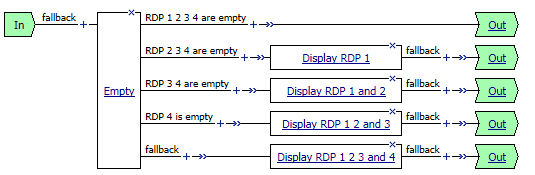
You can use an Empty action to branch on the existence of the AD attribute session variables, with the Branch rules outlined below:

You can also use the Advanced Resource Assign action to add the appropriate resource to the webtop.

This case study shows how flexible the BIG-IP platform can be when replacing legacy FirePass remote access with BIG-IP APM.
We typically respond same business day, but guarantee a response by the next business day.
